We are constantly adding new features to MapifyPro based on customer feedback (all of which are free for subscribing customers!). This month, we bring you the following updates and fixes:
MapifyPro 2.2.2 New Features!
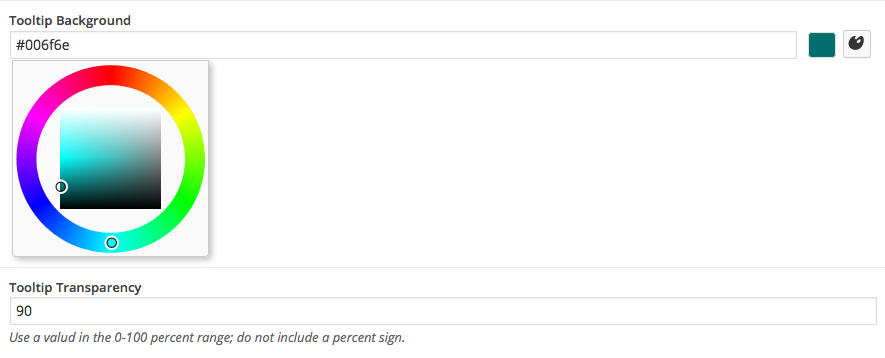
Tooltip Transparency Control
Now, not only can you specify the color of the tooltip, but also the transparency level. This means you can have a fully-solid tooltip of any color, or go for a more sleek look like on our demo, which uses a slight transparency with a black tooltip. Any color can be applied just as in earlier versions, but this provides another level of customization.
 Duplicate Locations With a Single Click
Many locations added to the map have very similar content. MapifyPro is fully compatible with Duplicate Post, a separate (free!) plugin that allows you to easily “Clone” locations and posts. By clicking the clone option under a location, it will create exactly that: an exact duplicate of everything you created while adding the initial location.
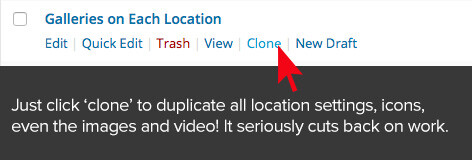 This means that the title, all info, photos, video, map marker icon, and the map location will be duplicated, making it MUCH easier when posting similar locations. Even the filters used with the location are duplicated, meaning you only need to tweak the details instead of creating everything from scratch. Trust us, this is an AWESOME feature and we used it when we made the home page demos maps.
Free MapifyPro Features: June 2015
Updated Features
Based on customer feedback, we realized that a few features needed some, er, tweaks. Here’s what we’ve updated to make life easier:
Accent Color Updated Functionality
The “Accent Color” setting in the Map Settings now applies to the Directions button and links on all variations of ther pop-up. Previously it only applied to the Article format when adding a blog post to the map.
No More Repeating Locations in Custom Image Mode
This was a pesky setting in the Google Maps Image Mode that forced locations to repeat indefinitely to the left and right of your map in Custom Image Mode. This has been addressed and locations will only appear on the actual map portion, and no longer repeat. Check out the Image Mode demo on the home page to check it out.
Shortcode Update
A small but useful tweak. Shortcodes now support height and width values of 100%, rather than only pixel dimensions. This will help those off you who want fullscreen maps.
Miscellaneous Tweaks and Fixes
- Just some standard updates to make sure things run smoothly:
- Updates to ensure compatibility with WordPress 4.2+
- Misc. stability fixes and compatibility updates for various themes.
- Updated the fonts to be more self contained and not use those from the theme. This keeps it more self-contained and less conflict-y with themes.
PrettyRoutesPro Update:
We’ve updated PrettyRoutesPro to ensure compatibility with WordPress 4.2+ and the updates applied to MapifyPro in this update. We’ve also address an issue where icons were not appearing, and maps were not showing.
That’s all for this update! As always, all updates are free to subscribers (Meaning customers) and we’ve got more in the works. Again we want to extend a huge thank you to the community for offering these suggestions, and for bearing with us during our transition to the new website. Luckily the tough times are behind us and we’re focusing on build the best team of developers around. Good things ahead 🙂
—Josh
Owner and Traveler :::: MapifyPro.com
Filed under: Uncategorized