Adrift Theme Tutorials and Demo .xml File

by Josh Sears on September 06th, 2016 under Tutorials

The Complete Series of Adrift Video Tutorials

Here you’ll find our complete series of Adrift video tutorials, and everything needed to get your site up and running in no time. First up, you’ll want to grab your demo data, which you can download from the following link:

Get the Adrift Demo Data Here.

The Tutorials

Next up, the tutorials!

1. Importing the .xml Demo and Basic Setup:

2. Setting up Your Home Page. Page Structure. Design Module Basics:

3. Your New Adrift Blog:

FAQ

What is the step by step Adrift tutorial like?

1. Importing the .xml Demo and Basic Setup

2. Setting up Your Home Page & Page Structure.

3. New Adrift Blog

Filed under: Tutorials

Introducing Adrift: The Best Maps Theme for WordPress

by Josh Sears on September 06th, 2016 under Updates

The Best Maps Theme for WordPress: Adrift

Whew, we worked hard on this one. After months in development, we’re extremely proud to announce Adrift, our first official theme that was handcrafted to present your maps in style. However, it does so much more, and is versatile enough to create the perfect website, no matter what the topic (even if you don’t care about maps!).

adrift-showcase

We’ll let you check out all of the advanced features on the product page, but suffice to say, this is one premium WordPress theme and we think you’re gonna like it. We also created a special launch video that contains a promo code for 10% off. We collaborated with the talented folks at PaperTelevision (our parent company), who produced the video.

Adrift is Available Now!

Make sure you check out our extensive demos to see what you can expect from Adrift. After that, feel free to grab yourself a copy here. We sell Adrift both as a stand-alone theme, or in a bundle that includes the ever-powerful MapifyPro.

FAQ

Can I use the Adrift demo?

Yes, you can. Make sure you check out our extensive demos to see what you can expect from Adrift (click http://adrift-the.me/). After that, feel free to grab yourself a copy here. We sell Adrift both as a stand-alone theme, or in a bundle that includes the ever-powerful MapifyPro.

Filed under: Updates

MapifyPro Version 2.4.6 Released

by Josh Sears on July 25th, 2016 under Uncategorized

Our development team has released a very crucial update to MapifyPro in order to make lives easier and prevent deadline-induced panic attacks. Here’s what’s new:

Say goodbye to API Activation
We’ve been doing some deep meditation on the ongoing state of MapifyPro’s API Keys. After much thought and introspection, we have decided to remove the need to activate MapifyPro until a more user-friendly solution is available. You must still have an active subscription to our software (we have to keep the pesky pirates at bay after all) but after updating to the latest version of MapifyPro, you’ll no longer need to manually activate it via API.

Google Lays Down The Law

Ultimately we will always be under Google’s thumb when it comes to using their API, and recently they have released a new requirement: Each instance of MapifyPro must be associated with a Google Maps Key Code. This means you need to create a code and enter it in wp-admin in order to properly display any instance of Google Maps. That includes MapifyPro. Luckily, it’s as easy as can be. Just follow these simple steps:

1. After setting up a Google developer’s account, simply grab your key here.

2. In your WP-admin, navigate to the MapifyPro tab, and select “MapifyPro Settings”. You’ll see the field where you need to paste the code. It’s as easy as that. Note however that you MUST update to the latest version of MapifyPro to see this new field. Here’s a visual:
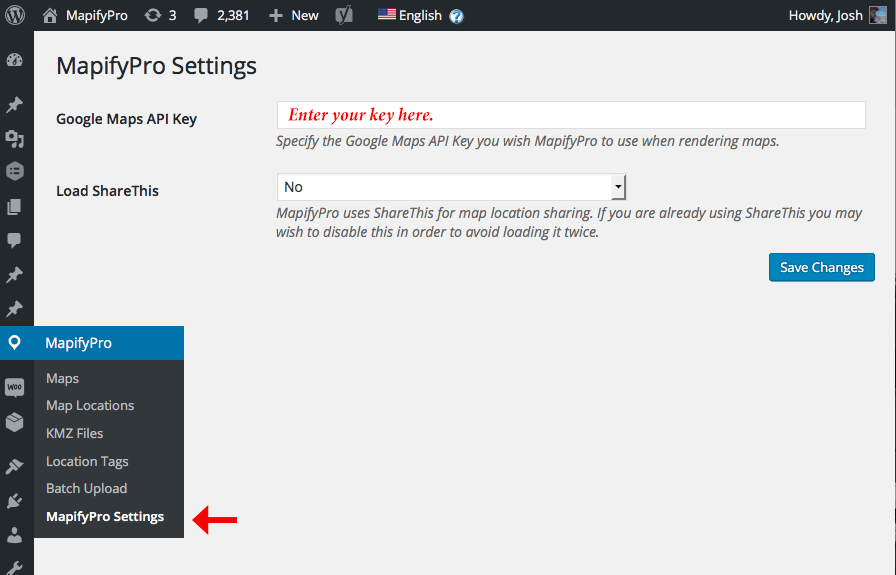
settings

Filed under: Uncategorized

Scroll to Top